Shakti does not Diagnose, Treat or Prevent Medical Disorders. No Statements about Shakti For Windows have been evaluated by the FDA.
Contact
|
. |
SETTING YOUR VOLUME (FIELD STRENGTH) FOR THE 8 COIL HEADSET
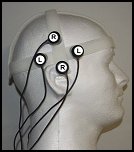
This page is for technicians and engineers who want to understand how the volume (field strength) is set.
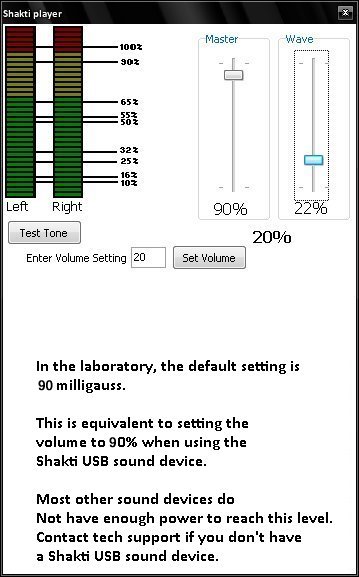
The Shakti software has a one-click utility that lets you optimize your Windows sound system. It works with Windows XP, Vista, Windows 7, Windows 8, Windows 8.1 and Windows 10. You enter the volume setting, and press the button that says “Set Volume.”
You can order The 8 Coil Shakti system with a plug-and-play USB device that produces the signals, making it easy to set or adjust the volume. There is also free tech support.
This is the volume setting panel for the Shakti Player. The Shakti software uses its own specialized Signal Generator (above) to produce the signals.
It has its own volume setting utility, making it easy to set your volume without having to use the Windows sound panel at all. Shakti will remember your volume level, using it only for Shakti. Your Shakti system’s volume level won’t affect your music, videos, or YouTube experience.
Engineers and technicians may want to use a Gauss meter.
What’s a Gauss meter? It’s a device that measures the strength of a magnetic field. It’s only used with the Shakti system to confirm that the coils are producing the magnetic fields.
Engineers and technicians may want to use a Gauss meter.
What’s a Gauss meter? It’s a device that measures the strength of a magnetic field. It’s only used with the Shakti system to confirm that the coils are producing the magnetic fields.
Most people will not need it at all.
If you think one of your coils isn’t working properly, you can send it back for a replacement. All coils are tested before shipping.
 Shakti technical support can give you advice about how to use a Gauss meter. However, there is only one model supported for use with Shakti, and it’s one of the easiest to use.
Note that the Gauss Meter is only to verify the signals, not to measure them.
_____
Complete instructions are embedded in the software. Free Tech Support is Available.
_____
8 Coil Shakti – $285.00
Shipping – (USA) $12.50 (International) – $25.00.
_____
In the USA, you can order by calling (toll-free):
855-408-7888
By calling this number, you agree that you understand and agree to the terms of sale, listed HERE.
Read them before you order.
_____
Email Your Questions About The 8 Coil Shakti
Contact Us
_____
30 Day Money Back Guarantee.
Refund terms and conditions
_____
Legal: Templates for many signals are licensed for use with Shakti For Windows by Dr. M.A. Persinger and Stan Koren.
.
.
.
.
.
.
.
.